
Back
Tags Management
What are tags?
Tag categories
Managing tags
Creating a category
Creating a tag
Editing or deleting a tag
Applying tags
Filtering by tag
Back
Tags Management
What are tags?
Tags are custom labels you attach to trades. They let you segment your performance by any dimension that matters to you — trading strategy, setup type, psychological state, session condition, or anything else.
Once tagged, trades are grouped and analyzed in the Reports → Tag Breakdown page and the Tags table in Reports → Overview.
Tag categories
Tags are organized into categories. A category is a group label (e.g., "Strategy", "Psychology", "Session"). Tags live inside categories.
This two-level structure keeps things organized when you have many tags.
Managing tags
Go to Settings → Tags Management.
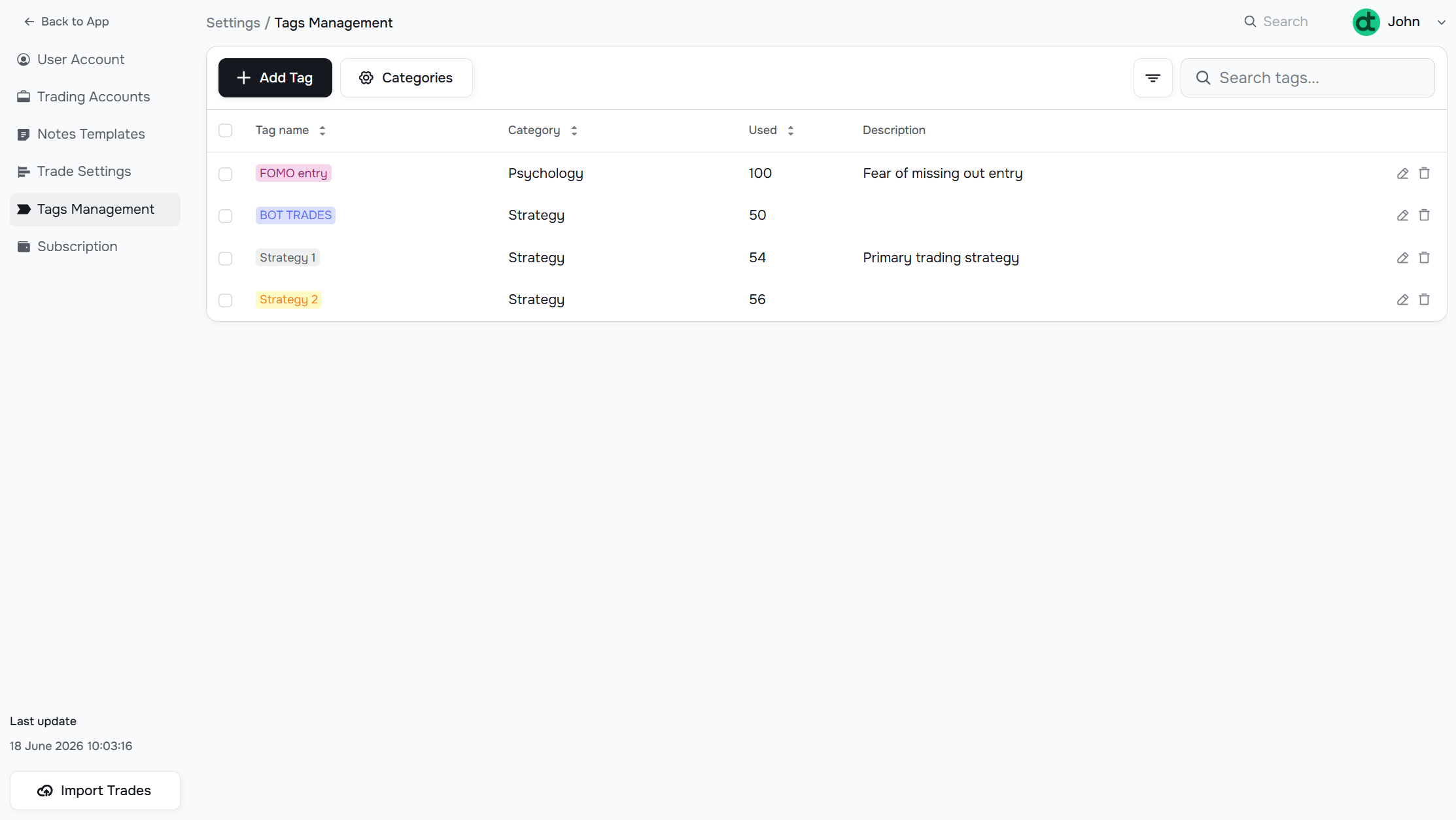
Creating a category
Click Categories to open the category manager. Add a name and save. You can create as many categories as you need.
Creating a tag
Click Add Tag. Fill in:
- Tag Name — short label shown everywhere (e.g., "FOMO Entry", "Breakout", "Revenge Trade")
- Category — which category this tag belongs to
- Description — optional. Shown in the tags table for reference.
Editing or deleting a tag
Use the edit (pencil) or delete (trash) icons on each row.
The Used column shows how many trades have this tag applied.
Applying tags
Tags can be assigned to trades in several ways:
- During import — select tags in the import form; all trades in that file receive those tags
- In the trade detail panel — open any trade and assign tags individually (see Trades Page)
- Bulk editor — select multiple trades on the Trades Page and assign tags in bulk
Filtering by tag
In the main filter bar, the Symbols, Tags, Account field lets you filter all views to one or more tags. Use this to analyze a specific strategy in isolation. See Using Filters for details on the full filter bar.
Have a question?
Let us help!
To get the best response, follow these steps when submitting your request:
Be Clear
Briefly describe the issue and any key details, like the feature used or an error message
Add Context
Explain what you were trying to do and what led to the issue
Attach a Screenshot (Optional)
A visual reference can speed up troubleshooting
We'll review your request and get back to you soon!
Get latest updates
on Datrade
Disclaimer: Datrade is not an investment advisor or signal provider. All market data and analytics are provided for informational purposes only and do not constitute financial advice or trading recommendations. Past performance is not indicative of future results, and no performance outcomes are guaranteed. Users are solely responsible for their trading decisions and actions; Datrade accepts no liability for any losses incurred from use of our data or content. Use of this site constitutes acceptance of our Terms of Service and Risk Disclosure.