
Datrade vs Edgewonk
What if the most useful trading data is the data you never logged?
Edgewonk is built to help you measure your process — rules, mistakes, discipline, emotions, missed trades, and the custom factors you choose to track.
Datrade adds a different layer automatically: the historical market state around every entry, even if you never tagged it when the trade happened.
What Datrade is
Datrade is a full trading journal built for quantitative post-trade research. It includes trade imports, Crypto Sync, manual entries, Notes, Tags, Calendar, unlimited accounts, performance and risk statistics, MFE/MAE, and exit analytics. Its differentiating layer automatically reconstructs historical market context around each entry and makes that data available through Filters, Compare, Pivot, and Scatter.
The 10,000+ figure refers to supported combinations of indicators, timeframes, periods, candle anchors, session settings, stock/event data and benchmark context — not 10,000 different indicators.
Both journals add context. The difference is where that context comes from.
Edgewonk is exceptionally customizable when you know what you want to record. Datrade is designed for objective market data you may not have known to record at all.
Edgewonk
The context you record.
Build checklists, tag mistakes and emotions, rate entry/exit/management decisions, track missed trades, and create Custom Statistics for the strategy or market factors that matter to you.
Datrade
The market context Datrade reconstructs for you.
Supported RSI, MACD, VWAP/EMA/SMA distance, RVOL, historical Market Cap and Shares Outstanding, SSR, halts, SPY context and other objective conditions are calculated from historical data around each entry.
Edgewonk is powerful when you know what you want to track. Datrade is powerful when you don't yet know what you'll want to investigate.
Automation means something different here
Edgewonk automates the review. Datrade automates the market-data enrichment.
Edgewonk's Edge Finder runs automatically every week and scans journal data to surface strengths, weaknesses, mistakes, and performance patterns. That's a genuine advantage if you want the journal to tell you where to look.
Datrade automatically calculates the supported historical market context for each entry after import or sync. That means the data needed for future questions already exists even if you never tagged the condition when the trade happened.
Datrade does not currently include an AI coach. Its automation is focused on building the historical research dataset.
You didn't tag RSI or RVOL six months ago. Now what?
This is where the difference becomes practical.
Edgewonk Custom Statistics
Define what matters, then record it.
Edgewonk lets you create custom inputs for market conditions, indicator signals, chart patterns, mental state, timeframe and more. Those inputs can then be analyzed in Chart Lab.
Datrade historical reconstruction
Ask the question later.
Import the history and Datrade calculates supported objective market values from historical data around each entry. You can then investigate conditions you never manually logged at the time.
Historical market coverage goes back to 2018 where the required underlying data is available.
How Datrade actually works.
The market-context layer is automatic; you do not need to prepare it before the trade.
Import or sync
Bring in your broker executions.
Calculate each entry
Datrade reconstructs the supported historical market state around every distinct entry.
Research later
Filter, compare and visualize results by those values whenever a new question comes up.
Scale-ins keep their own context. A later entry into the same position can have different RSI, VWAP distance, RVOL and other supported values than the first entry.
Point-in-time means the settings actually matter.
Current vs Previous Candle
If you enter at 10:17:26 on a 15-minute timeframe, Current looks at the market state through the entry time; Previous uses the last completed 15-minute candle before the entry.
Regular vs Extended hours
For U.S. equities, supported indicator research can use Regular-hours or Extended-hours data where that setting is available.
SPY benchmark context
SPY is currently Datrade's market benchmark. Supported SPY RSI, MACD, EMA/SMA relationships and other market context can be analyzed alongside the trade.
What can you actually do with that data?
The job is not to collect more statistics. It is to find the conditions associated with your strongest and weakest results, then refine what you trade and which conditions you avoid.
Are my shorts worse when RSI is already above 80?
Group historical entries by RSI range and compare P&L, Profit Factor, Win Rate, R:R and other performance metrics.
Do I actually have an edge 5–10% above VWAP?
Use the historical numerical distance from VWAP instead of relying on a manually created “extended” tag.
Does high RSI only hurt me when RVOL is low?
Combine conditions instead of evaluating a single factor in isolation.
Does my setup break when SPY is weak?
Research trades against supported SPY technical and market context.
From market data to actual research.
No manual RSI tag required
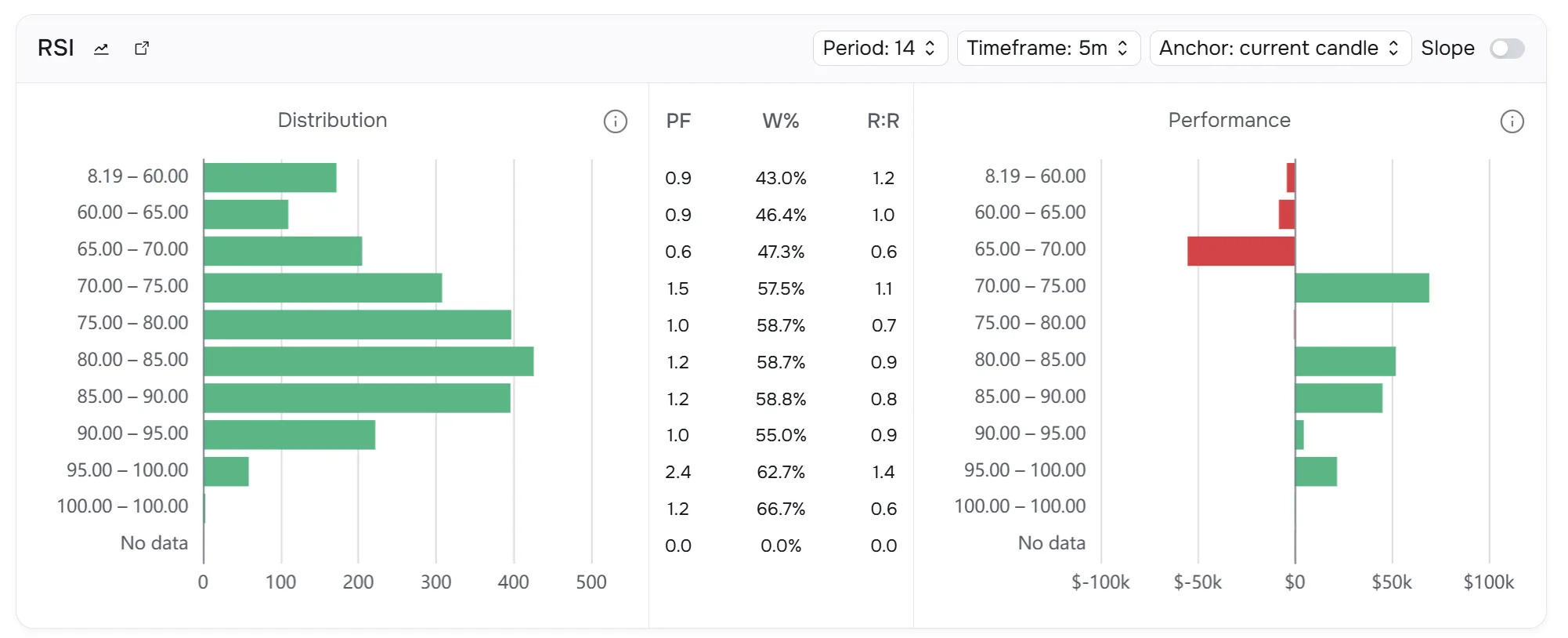
Turn RSI-at-entry into a journal-wide variable.
Datrade calculates the supported RSI value for historical entries, then lets you group results by RSI range using a defined Period, Timeframe and Candle Anchor.
Compare
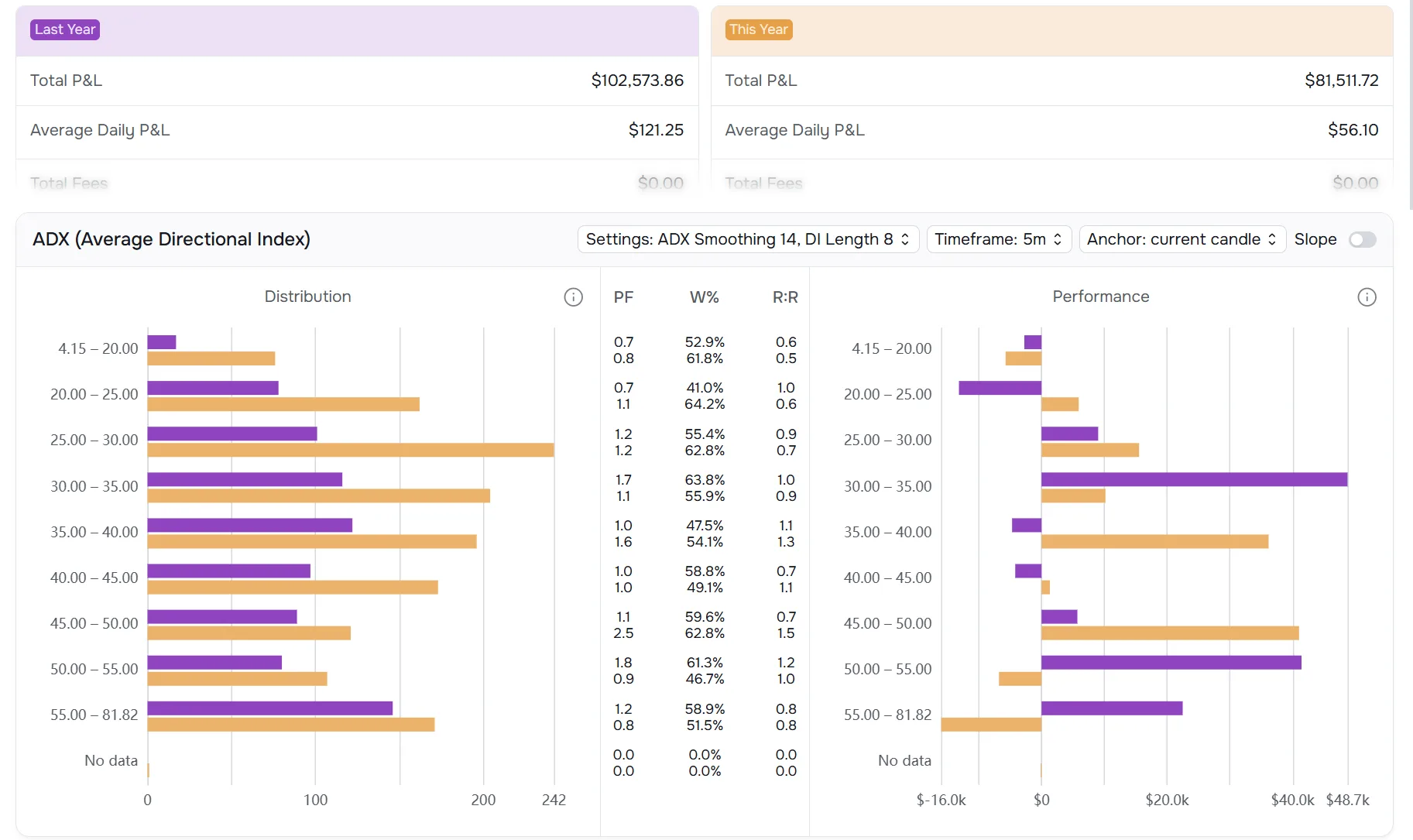
Compare two groups built from the market data Datrade reconstructed.
Use ordinary account, tag and trade filters together with supported historical market-context conditions, then compare the two groups side by side.
Pivot
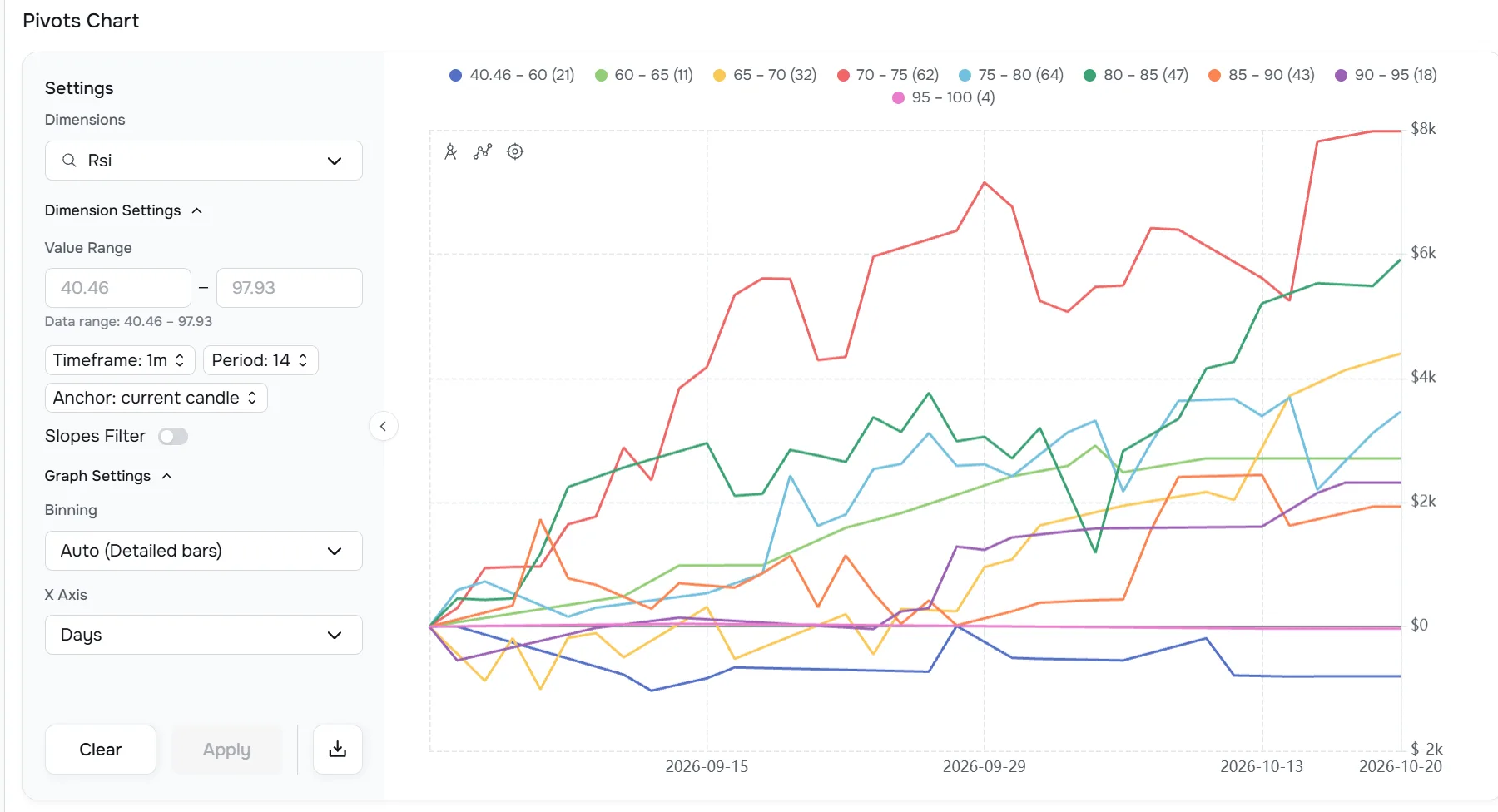
A profitable bucket doesn't necessarily mean you found an edge.
Pivot shows cumulative performance for different ranges across Trades or Days, so you can see whether an apparent edge persisted or came from a small number of outliers.
Scatter
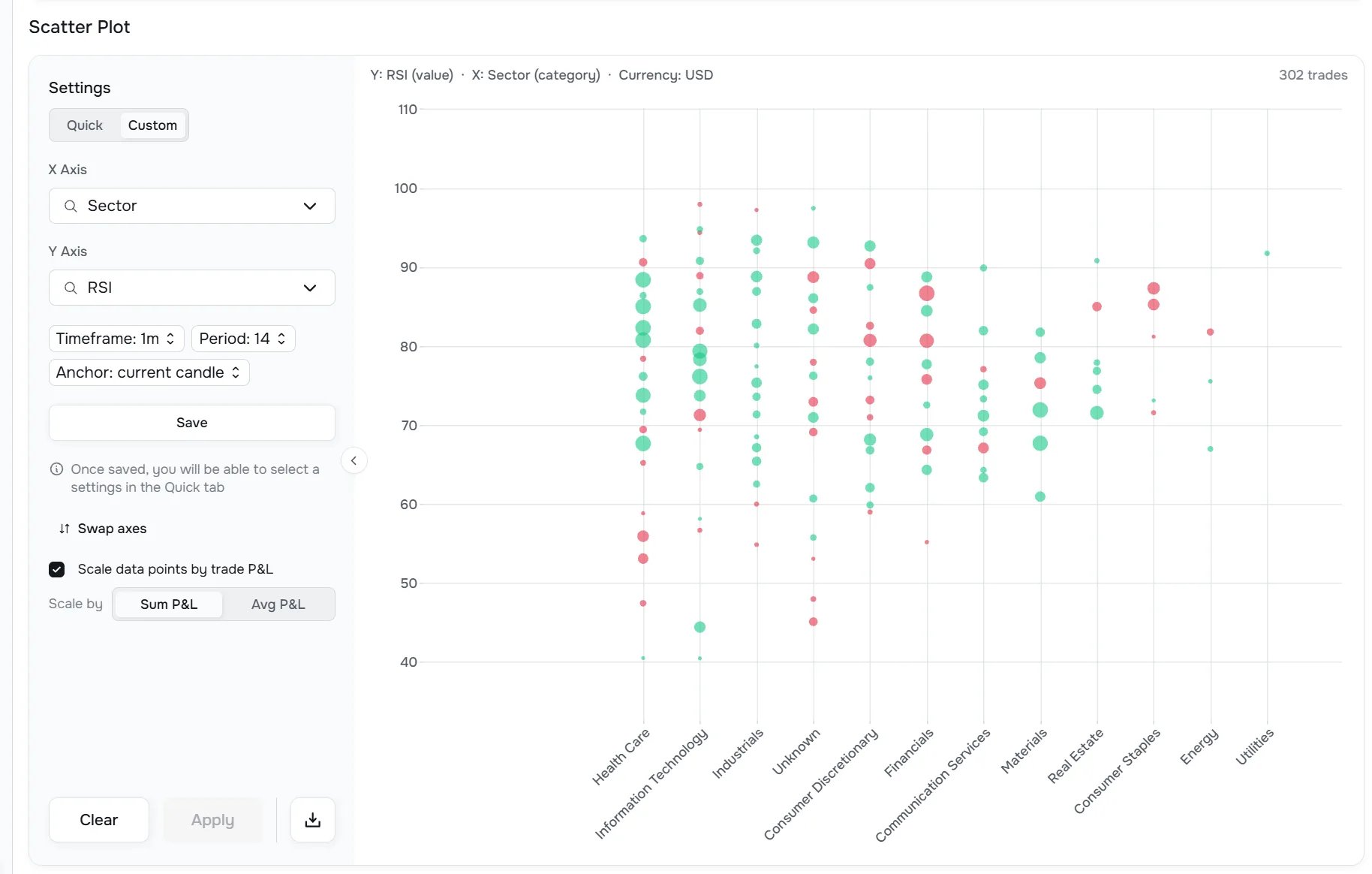
See how two conditions interact.
Put one supported market or trade variable on each axis and see where profitable and unprofitable trades cluster — using the historical context calculated around your entries.
Important: Datrade surfaces historical relationships and patterns. It does not by itself prove that one market condition caused the result.
Where each journal is genuinely stronger.
Datrade's core advantage is the depth of market context available for research. Edgewonk is stronger in process, psychology and planning workflows.
Datrade
Automatic historical market reconstruction
Datrade calculates objective market context for old trades even when you never tagged those conditions.
Point-in-time entry analysis
Research the market state around each entry using timeframe, period, Current/Previous and session settings.
Ask new questions about old trades
Come back months later and test conditions that were never part of your original journal workflow.
Historical stock and event context
Analyze Market Cap, Shares Outstanding, SSR, halts, split-aware values and other supported historical facts.
Multi-factor market research
Use Filters, Compare, Pivot and Scatter across the reconstructed dataset to find where results change.
Edgewonk
Psychology and discipline
Tiltmeter, mistake tracking, rule adherence and session review.
Process and planning
Checklists, Trading Plans, Missed Trades and report cards.
Automated weekly review
Edge Finder highlights strengths, weaknesses and performance leaks.
Strategy and trade-management tools
Strategy testing, simulation, trade-management analysis and interactive charts.
Broader coverage
Unlimited trades/accounts, 200+ imports and wider asset support.
Datrade vs Edgewonk: the decision-relevant differences.
Only decision-relevant differences are shown here. Parity features and plan details are covered elsewhere so they do not distort the comparison.
| Capability | Datrade | Edgewonk |
|---|---|---|
| Main analytical focus | Market conditions around actual historical entries | Trading process, psychology, rules, setups and performance |
| Full trading journal | Yes | Yes |
| Automatic historical market-context reconstruction | Core product architecture | No comparable journal-wide capability found in current public documentation |
| Point-in-time technical state at entry | Yes | Can track indicator/market inputs through Custom Statistics; no comparable automatic entry-level matrix found |
| Current vs Previous Candle research | Yes | No comparable capability found in current public documentation |
| 10,000+ precomputed context values per entry | Yes | Edge Finder scans journal data, but this is a different data model |
| Research market conditions you never tagged | Yes, for supported objective context | Custom market inputs are generally user-defined and recorded through Custom Statistics |
| Psychology, discipline & planning | Notes + custom tags | Tiltmeter, mistake tracking, checklists, Trading Plans, Missed Trades and rule-adherence tools |
| Automated review | No AI coach | Edge Finder weekly scan |
| Strategy testing & simulation | No dedicated simulator | Alternative Strategy Testing + Performance Simulator |
| Exit / trade-management analysis | Best Exit + Exit Efficiency | Exit Analysis + Trade Management analysis |
| Broker / platform coverage | Crypto Sync (Bybit, Binance) + broker file imports | 200+ advertised; MT5 auto-sync + broad import support |
| Markets | U.S. equities, Crypto, Forex | Stocks, Forex, Crypto, Futures, Options, Indices, Commodities |
| Starting monthly price | $14 | $35 base monthly price before applicable VAT |
| Try before / refund | 7-day full trial + 7-day refund window | 14-day money-back guarantee after purchase |
Not shown as separate rows: advanced filtering, MFE/MAE, unlimited accounts, individual trade charts and import-limit details. Those are either shared capabilities or covered in the product/pricing sections above and below.
Monthly pricing.
Datrade starts lower. Edgewonk uses one full-feature plan with unlimited trades and journals.
Datrade
Basic
1,000 raw executions/year · Unlimited accounts · Full underlying market-context coverage
Explore demo data or upload your own trades before paying.
Annual billing: up to 30% off · 7-day refund window after first payment
Edgewonk
One full-feature subscription
All features are included whether you choose monthly or annual billing.
Unlimited journals/accounts · Unlimited trade imports · Unlimited trades · 14-day, 100% money-back guarantee.
Edgewonk lists country-specific VAT-inclusive prices for EU/UK customers; promotional annual pricing can change, so this comparison uses the standard base monthly price.
The bottom line
Edgewonk helps you measure the trader. Datrade helps you measure the market around the trader.
Choose Edgewonk when the biggest problem is discipline, psychology, rule-following, missed trades, planning, or trade management. Choose Datrade when the biggest question is which objective market conditions were present when your real entries worked — including conditions you never thought to log.
What was actually happening in the market when I clicked — and does my edge survive those conditions?
That is the question Datrade was built to help answer.
Frequently asked questions.
Which is better for quantitative market-context research: Datrade or Edgewonk?
Datrade is the stronger fit when the main job is researching objective historical market conditions around actual entries. Edgewonk is especially strong when the main job is improving psychology, discipline, rule adherence and trading process.
Does Edgewonk analyze market conditions?
Yes. Edgewonk's Custom Statistics can track market conditions, indicator signals, volatility, trend state, news environment and other user-defined factors. The important difference is that these inputs are generally defined and recorded by the trader, while Datrade automatically reconstructs a large supported set of objective historical market data around each entry.
Can Datrade analyze market conditions I never tagged when the trade happened?
Yes, for supported objective market context. After you import or sync historical trades, Datrade calculates those values from historical market data around each entry, so you can ask many questions later without having tagged the condition at the time.
Does Edgewonk have AI or automated insights?
Yes. Edge Finder automatically scans Edgewonk journal data every week and highlights strengths, weaknesses, mistakes and performance patterns. Datrade does not currently include an AI coach; its automation is focused on calculating and storing the historical market context used for research.
Does Edgewonk automatically calculate RSI, MACD or RVOL for every historical entry?
Edgewonk supports user-defined indicator and market-condition tracking through Custom Statistics and has interactive trade charts. We did not find a comparable public capability that automatically reconstructs a journal-wide matrix of supported RSI, MACD, RVOL and other point-in-time values for every historical entry.
Which is better for psychology and discipline?
Edgewonk. Tiltmeter, trade comments, Efficiency, checklists, psychology tracking, Session reviews and Missed Trades create a much deeper dedicated behavioral workflow than Datrade currently offers.
Is Datrade still a full trading journal?
Yes. Datrade includes trade imports, Crypto Sync, manual entries, Notes, Custom Tags, Calendar, unlimited accounts, commissions, R-multiple, MFE/MAE, risk/performance statistics and exit analytics. Historical market-context research is the layer that differentiates it.
Which platform supports more markets and brokers?
Edgewonk currently has broader coverage. It advertises 200+ broker/platform imports and supports Stocks, Forex, Crypto, Futures, Options, Indices and Commodities. Datrade currently focuses on U.S. equities, Crypto and Forex.
How does free access differ?
Datrade offers a 7-day trial where you can use demo data and upload your own trades before paying. Edgewonk's current pricing page emphasizes a 14-day money-back guarantee after purchase rather than a free trial.