
Datrade vs TraderSync
Datrade vs TraderSync: Which trading journal is better for understanding your edge?
Datrade and TraderSync are both full trading journals, but they are built around different approaches to improving performance.
Datrade turns your actual trading history into a researchable historical market-context database. It reconstructs technical, volume, stock, event, and broader-market conditions around each entry so you can identify which objective conditions are associated with your best and worst results.
TraderSync places more emphasis on replay, AI coaching, simulation, and broader trading-process workflow tools.
What Datrade is
Datrade is not a market-data add-on. It is a full trading journal and post-trade analytics platform. It includes trade imports, Crypto Sync, manual entries, Notes, Tags, Calendar, unlimited accounts, performance/risk statistics, exit analytics, and advanced historical market-context research. Datrade reconstructs context around each entry, precomputes 10,000+ market-context values per entry, and lets traders investigate them through Advanced Filters, Compare, Pivot, and Scatter.
Why data-driven traders choose Datrade.
Datrade is built to answer a specific high-value job: under which objective market conditions do your real trades perform best — and when does that edge disappear?
Historical Market Context Engine
Objective technical, instrument, event, volume and benchmark context around historical entries.
Your broker records the trade. Datrade reconstructs the environment in which you made it.
Point-in-Time Analysis
Current Candle focuses on entry-time context. Previous Candle focuses on the completed signal candle.
10,000+ Values per Entry
Supported periods, timeframes, anchors, sessions, instrument attributes, events and SPY context are precomputed for later research.
Research Without Pre-Tagging
Build the objective database first. Decide months later which conditions or combinations to investigate.
You shouldn't need to know today every question you'll want to ask tomorrow.
Short on time? Here's the difference.
Choose Datrade if
You want to discover under which objective market conditions your actual trades work.
Datrade is the stronger fit for quantitative post-trade research across technical indicators, volume conditions, stock characteristics, historical events, SPY context, and combinations of those dimensions.
Choose TraderSync if
Replay, AI coaching, simulation, and broader workflow tools matter more than deep historical market-context research.
TraderSync is the stronger fit for traders who prioritize those process-oriented tools.
Datrade is not a market-data add-on. It's a full trading journal.
The historical market-context engine sits on top of a complete journal workflow you can use as your primary trading journal.
Datrade workflow
TraderSync workflow
Questions Datrade can answer about your trading.
This is the practical difference between having market data somewhere in the product and having it structured across your historical entries.
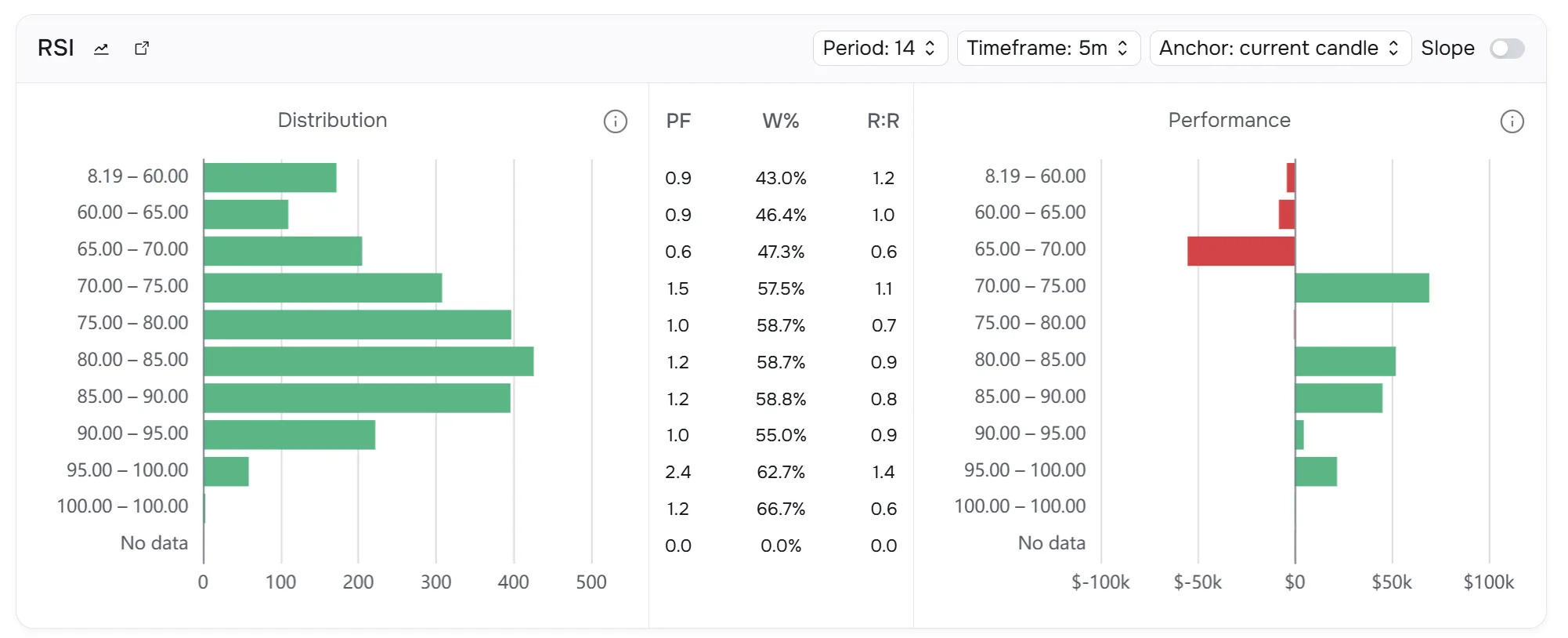
Do my trades perform worse when RSI is above 80 at entry?
Group actual historical entries by RSI and compare P&L, Profit Factor, Win Rate, R:R and other metrics.
Are my shorts more profitable 5–10% above VWAP?
Use numerical historical Distance from VWAP instead of a manually defined setup.
Does high RSI only hurt when RVOL is low?
Combine conditions instead of evaluating one variable in isolation.
Is my edge limited to stocks below $100M Market Cap?
Filter by historical Market Cap and compare performance.
Do my results change under SSR or after a halt?
Use historical Rule 201 / SSR and halt context.
Does my strategy perform worse the day after SPY closes with high RSI?
Use SPY Market RSI on a daily timeframe with Previous Candle.
Does repeatedly trading the same ticker hurt my results?
Daily Ticker Trade analyzes later same-ticker entries during the day.
Is my first entry good, but my third or fourth scale-in bad?
Daily Ticker Positions analyzes the depth of same-ticker scaling at each entry.
From one condition to deeper research.
Standard widgets
Start with one condition.
This RSI example groups actual historical entries into ranges and shows Distribution, Profit Factor, Win Rate, R:R and P&L using a defined Period 14 · 5m · Current Candle setup.
Compare
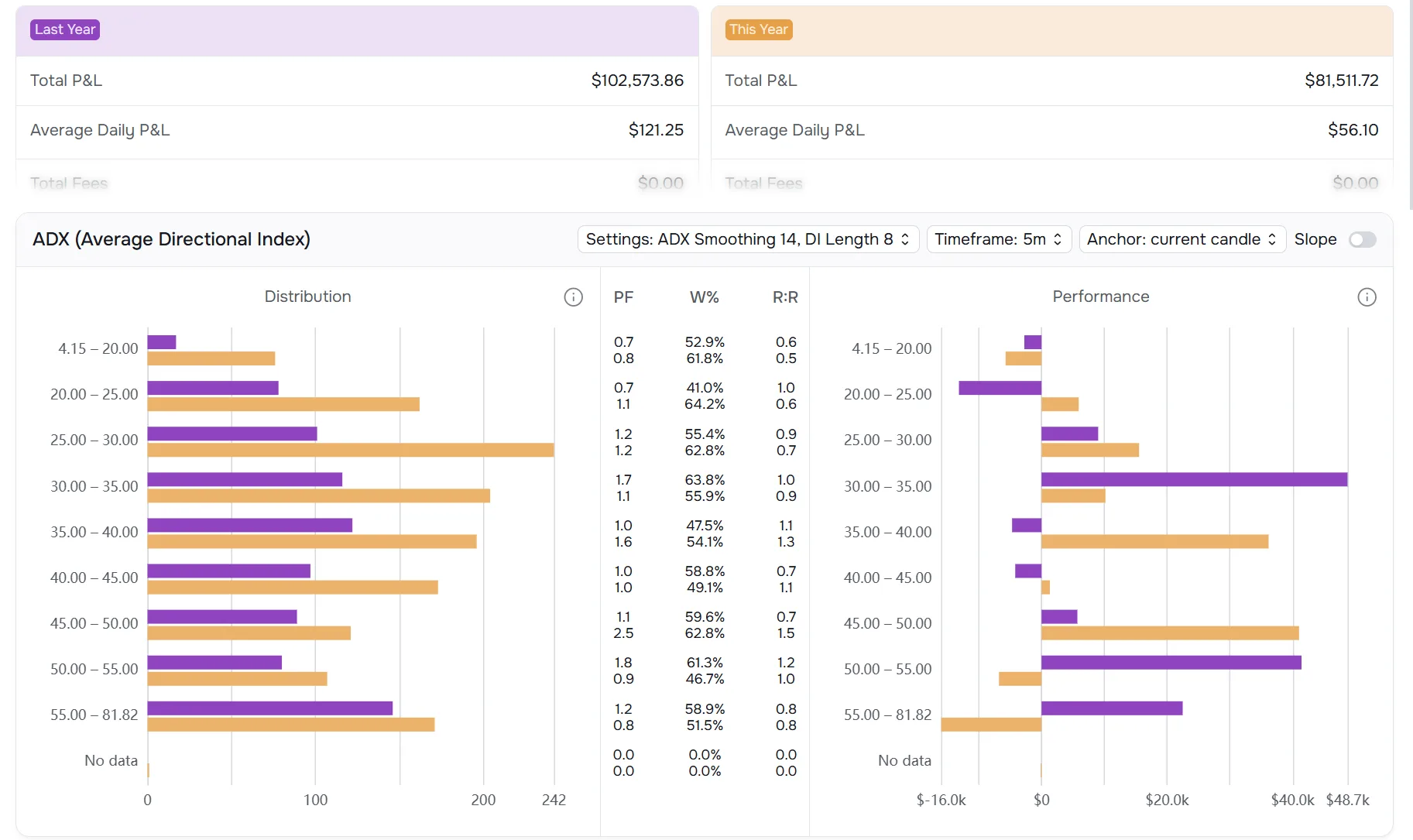
Both can compare groups. The difference is what the groups can be built from.
TraderSync has a real Comparative report. Datrade Compare uses the full Datrade market-context/filter system. The screenshot shows Last Year vs This Year analyzed on the same ADX settings, range by range.
Pivot
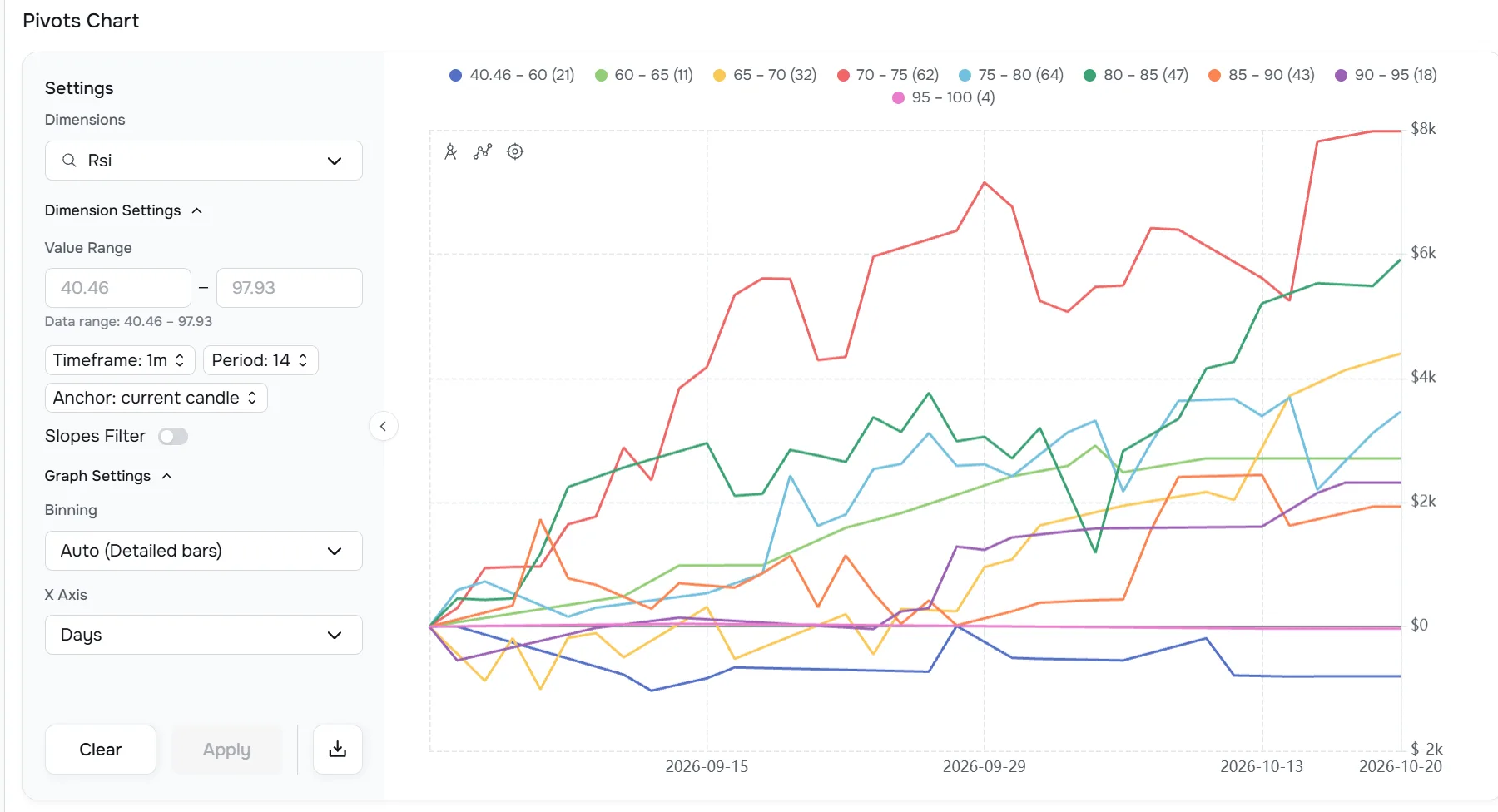
A profitable bucket is not necessarily a stable edge.
Pivot plots cumulative performance curves for ranges of a selected dimension across Trades or Days.
Scatter
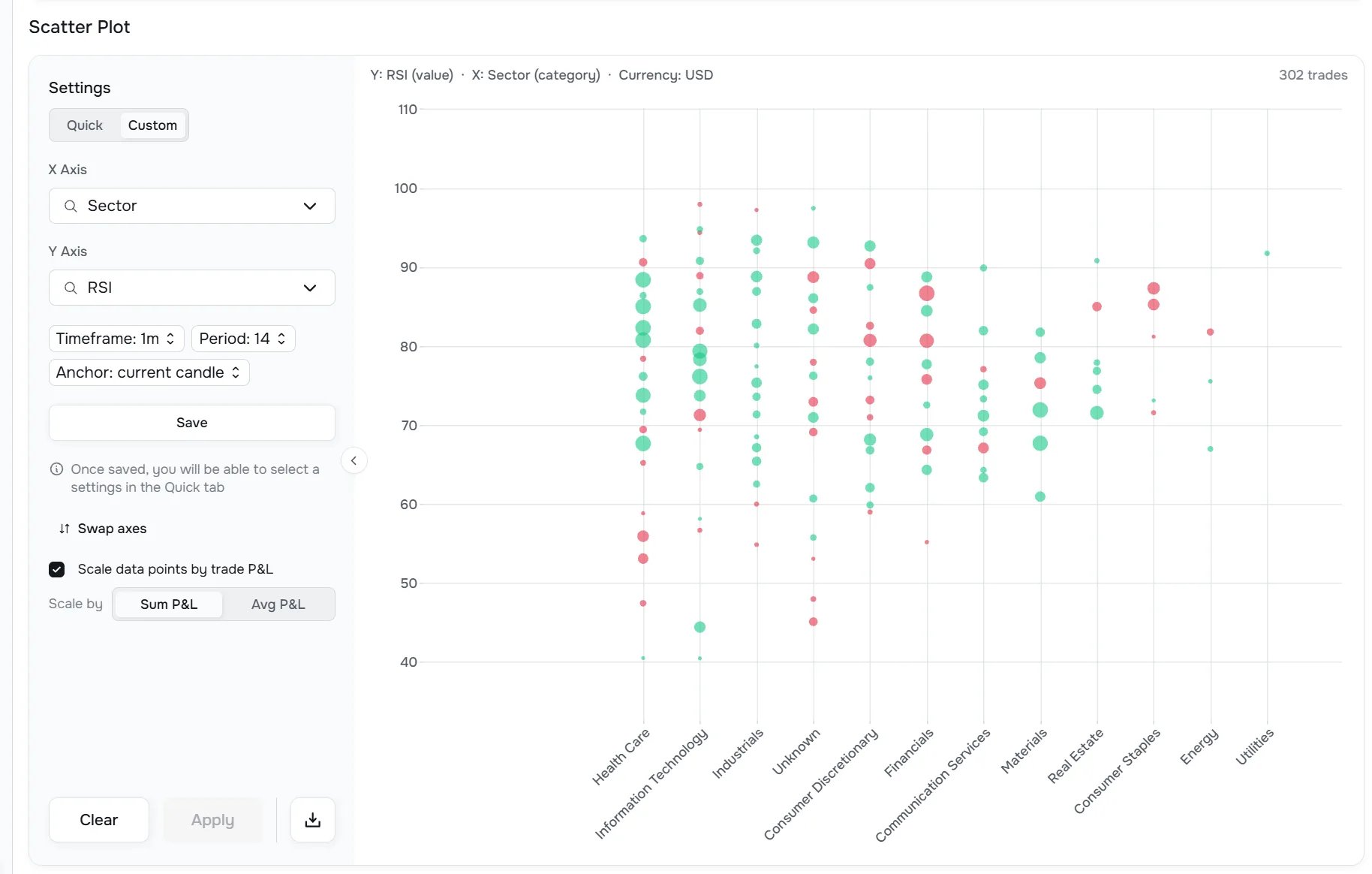
Explore how two factors interact.
Scatter plots two dimensions against each other while retaining exact per-trade values.
Where each platform has the edge.
The right choice depends on the job you want the journal to do. Datrade is optimized for quantitative research; TraderSync puts more emphasis on workflow, replay, coaching, and simulation.
Datrade
Point-in-time market context
Historical technical and market state around actual entries.
Current vs Previous Candle
Separate execution-time context from completed signal context.
10,000+ precomputed values
Deep historical context ready for later research.
Research without pre-tagging
Ask new objective questions about old trades.
Pivot + Scatter
Research stability and multi-factor relationships across context dimensions.
Strong value
$14 Basic with unlimited accounts; Pro from $44.
TraderSync
AI & coaching
Cypher Assistant and plan-dependent coaching capabilities are live today.
Replay, backtesting & simulation
TraderSync combines replay, backtesting, What If analysis and other simulation/execution-review tools.
Planning & trading-process workflow
Strategy Checker, planning/rule-adherence tools, stops/targets and related process features are more developed.
Broader access
Native mobile, 700+ advertised brokers/platforms and broader asset coverage.
If those broader process tools matter more than deep point-in-time market-context research, TraderSync may be the better fit.
Does TraderSync have market analytics? Yes — but the data model is different.
TraderSync has legitimate market-related reports and filters, and it also exposes technical indicators inside replay/chart workflows. Datrade's differentiation is not that TraderSync has no market data. It is that Datrade makes a much broader set of historical technical and market conditions structured entry-level dimensions across the journal.
TraderSync market reports
Useful documented fields include Market Cap, Sector, Volume Change, Change %, SPY/SPX Market Movement, Opening Gap, MFE/MAE and Best Exit.
TraderSync chart / replay context
Technical indicators exist inside replay and chart workflows, which is useful for simulation and execution review.
Datrade historical research layer
RSI, MACD, VWAP/EMA/SMA distance, RVOL, historical Market Cap/Shares, SSR, halts and SPY technical state can become structured dimensions around actual historical entries.
Example: “How did my shorts perform when SPY RSI was high, the stock was 5–10% above VWAP, RVOL was above 4, and Market Cap was below $100M at the entry context?”
Datrade vs TraderSync: feature comparison.
We focus on material buying criteria instead of turning every niche feature into a separate win.
| Capability | Datrade | TraderSync |
|---|---|---|
| Primary focus | Full trading journal built around quantitative post-trade research | Full trading journal with stronger AI / replay / simulation emphasis |
| Journal fundamentals | Yes | Yes |
| Historical market-context database | Core product architecture | Market reports and replay data available; no comparable entry-level technical-context matrix found in public docs |
| Point-in-time technical context at entry | Yes | No comparable journal-wide capability found in current public docs |
| Current vs Previous Candle | Yes | No comparable capability found in current public docs |
| 10,000+ values per entry | Yes | No comparable precomputed entry-level dataset found in current public docs |
| SPY technical state at entry | Yes | SPY/SPX Market Movement and Opening Gap reports |
| Research without pre-tagging | Yes | More dependent on journal/report fields, strategy/rule definitions and existing classifications |
| Advanced multi-condition filtering | Yes | Yes |
| Two-group comparison | Compare | Comparative |
| Cumulative performance by market-condition range | Pivot | No comparable capability found in current public docs |
| Two-variable historical context analysis | Scatter | Different analytics/reporting workflow |
| AI / coaching | No | Yes |
| Replay / backtesting / simulation | No | Yes |
| Native mobile | No | Yes |
| Trading accounts | Unlimited | Varies by plan |
| Broker connectivity | Crypto Sync (Bybit, Binance) + broker file imports | 700+ advertised brokers/platforms |
| Market coverage | U.S. equities, Crypto, Forex | Broader support incl. Futures / Options workflows |
| Starting paid monthly price | $14 | $29.95 |
| Refund after payment | 7-day refund window | No refunds |
TraderSync also has more granular execution/replay features. They are intentionally grouped here under replay, simulation and trading-process workflow rather than counted as separate reasons to choose the product.
Monthly pricing.
TraderSync annual promotional pricing is intentionally omitted because it changes independently from the standard monthly prices.
Datrade
Basic
1,000 raw executions/year · Unlimited accounts · Full underlying market-context coverage
Explore demo data or upload your own trades before paying.
Annual billing: up to 30% off · 7-day refund window after first payment
TraderSync
Regular monthly paid plans
TraderSync also offers a no-expiry free Basic plan with limited file imports and unlimited manual entry. Paid features can be tried for 7 days, and paid purchases are non-refundable.
The decision frame
If your job is understanding your actual edge, depth matters more than feature count.
TraderSync offers a broader set of process tools. Datrade is designed around a different priority: turning your actual trading history into a structured research dataset that can explain which objective market conditions are associated with your strongest and weakest results.
For quantitative post-trade research, the important question is not “How many tools are in the platform?” It is “How much of the market state around my real trades can I actually investigate?”
The bottom line
Datrade and TraderSync are both full trading journals. They are optimized for different kinds of improvement.
Datrade is the stronger fit for traders who want deep quantitative post-trade research on their actual history. TraderSync is the stronger fit when replay, AI coaching, simulation, and broader process tooling are the priority.
What was actually happening in the market when I entered — and under which of those conditions do I perform best?
That is the problem Datrade was built to solve.
Frequently asked questions.
Which platform is better for quantitative post-trade research?
Datrade. It is built around reconstructing and aggregating objective historical market context across real entries. TraderSync is stronger when replay, AI coaching, simulation, and broader process tools are the priority.
Is Datrade suitable as my main trading journal?
Yes. Datrade is a full trading journal with imports, Crypto Sync, manual trade entry, Notes, Tags, Calendar, unlimited accounts, commissions, R-multiple, MFE/MAE, performance/risk statistics, exit analytics and advanced market-context research.
Does Datrade only analyze technical indicators?
No. Datrade also analyzes volume and participation, stock characteristics, historical market events, SPY benchmark context, trade behavior, exits, accounts, tags, position size and other supported dimensions.
Does TraderSync have market-condition analytics?
Yes. TraderSync has market-related filters/reports including Market Cap, Volume Change, Change Percent, SPY/SPX market movement, SPY/SPX opening gap, Sector, MFE/MAE and Best Exit. Datrade's difference is the breadth and structure of point-in-time market context attached to entries across the historical journal.
Does TraderSync have RSI, VWAP and technical indicators?
Yes. TraderSync has indicators in Market Replay/chart workflows. Datrade's differentiation is not simply having the indicator on a chart; supported historical indicator values become structured analytical dimensions around real entries and can be aggregated across the journal.
Can Datrade analyze RSI at historical entry time?
Yes. Current Candle is designed around market information available through the actual trade timestamp.
Can Datrade analyze the previous signal candle?
Yes. Previous Candle uses the last completed candle before entry.
Can Datrade analyze yesterday's SPY RSI against today's trades?
Yes. Use SPY Market RSI on a daily timeframe with Previous Candle.
Does TraderSync compare two groups of trades?
Yes. TraderSync has Comparative and Datrade has Compare. Datrade's distinction is the breadth of historical market-context dimensions that can define those groups.
Does TraderSync have simulation tools beyond replay?
Yes. TraderSync includes simulation-oriented tools such as What If analysis and backtesting. Datrade does not currently have a comparable simulation layer; its focus is historical market-context research around actual imported trades.
Which product has better replay?
TraderSync. Datrade does not currently have native Trade Replay or Market Replay.
Which product has AI?
TraderSync has Cypher Assistant and higher-tier coaching capabilities. Datrade does not currently include an AI assistant.
Does Datrade have Best Exit?
Yes. Datrade Best Exit evaluates the maximum P&L available through the end of the full available trading session. Exit Efficiency separately measures actual exit capture during the real trade lifetime.
How far back does Datrade historical market data go?
From 2018 where the required underlying data is available.