
Back
Trading Accounts
What is a trading account?
Managing accounts
Adding an account
Renaming an account
Deleting an account
Filtering by account
When to use multiple accounts
Back
Trading Accounts
What is a trading account?
In Datrade, a trading account is a named container that groups your imports. Every time you import a file, you assign it to an account. This lets you keep trades from different brokers, desks, or strategies cleanly separated.
One default account is created when you sign up.
Managing accounts
Go to Settings → Trading Accounts to see all your accounts.
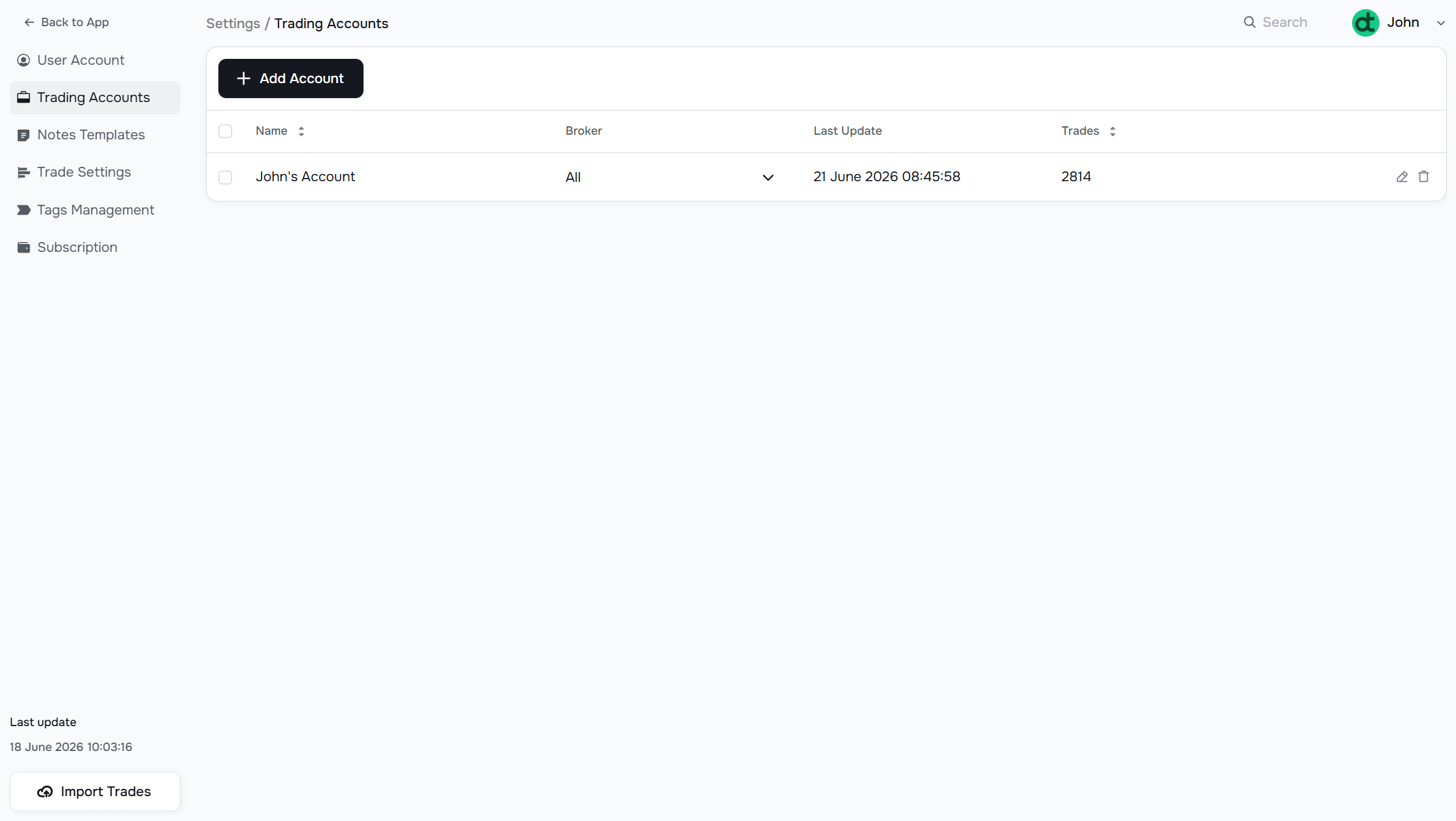
The table shows:
- Name — the account label you assigned
- Broker — the broker(s) from which trades have been imported into this account
- Last Update — timestamp of the most recent import into this account
- Trades — total number of executions in the account
Adding an account
Click Add Account and enter a name. The account is ready to use immediately and will appear as an option in the import screen.
Renaming an account
Click the edit icon (pencil) on the row. Change the name inline and confirm.
Deleting an account
Click the delete icon (trash) on the row. Be careful — deleting an account also removes all trades associated with it.
Filtering by account
In the main filter bar (top of any data page), the Symbols, Tags, Account field lets you filter all views to a specific account. This is useful when you want to analyze one broker or strategy in isolation.
When to use multiple accounts
- You trade with two or more brokers and want to keep their data separate
- You run different strategies (e.g., live vs. paper trading) that should never be mixed
- You manage multiple traders and want to track each desk independently
Have a question?
Let us help!
To get the best response, follow these steps when submitting your request:
Be Clear
Briefly describe the issue and any key details, like the feature used or an error message
Add Context
Explain what you were trying to do and what led to the issue
Attach a Screenshot (Optional)
A visual reference can speed up troubleshooting
We'll review your request and get back to you soon!
Get latest updates
on Datrade
Disclaimer: Datrade is not an investment advisor or signal provider. All market data and analytics are provided for informational purposes only and do not constitute financial advice or trading recommendations. Past performance is not indicative of future results, and no performance outcomes are guaranteed. Users are solely responsible for their trading decisions and actions; Datrade accepts no liability for any losses incurred from use of our data or content. Use of this site constitutes acceptance of our Terms of Service and Risk Disclosure.