
Back
Risk Settings
What is initial risk?
How rules work
Rule priority
Risk types
When rules apply
Example setup
Back
Risk Settings
What is initial risk?
Initial risk is the amount you planned to lose if a trade went fully against you — your "max loss" at the time of entry. Datrade uses this value to calculate R:R (risk-to-reward ratio) and other risk-based metrics — see Metrics Glossary for definitions.
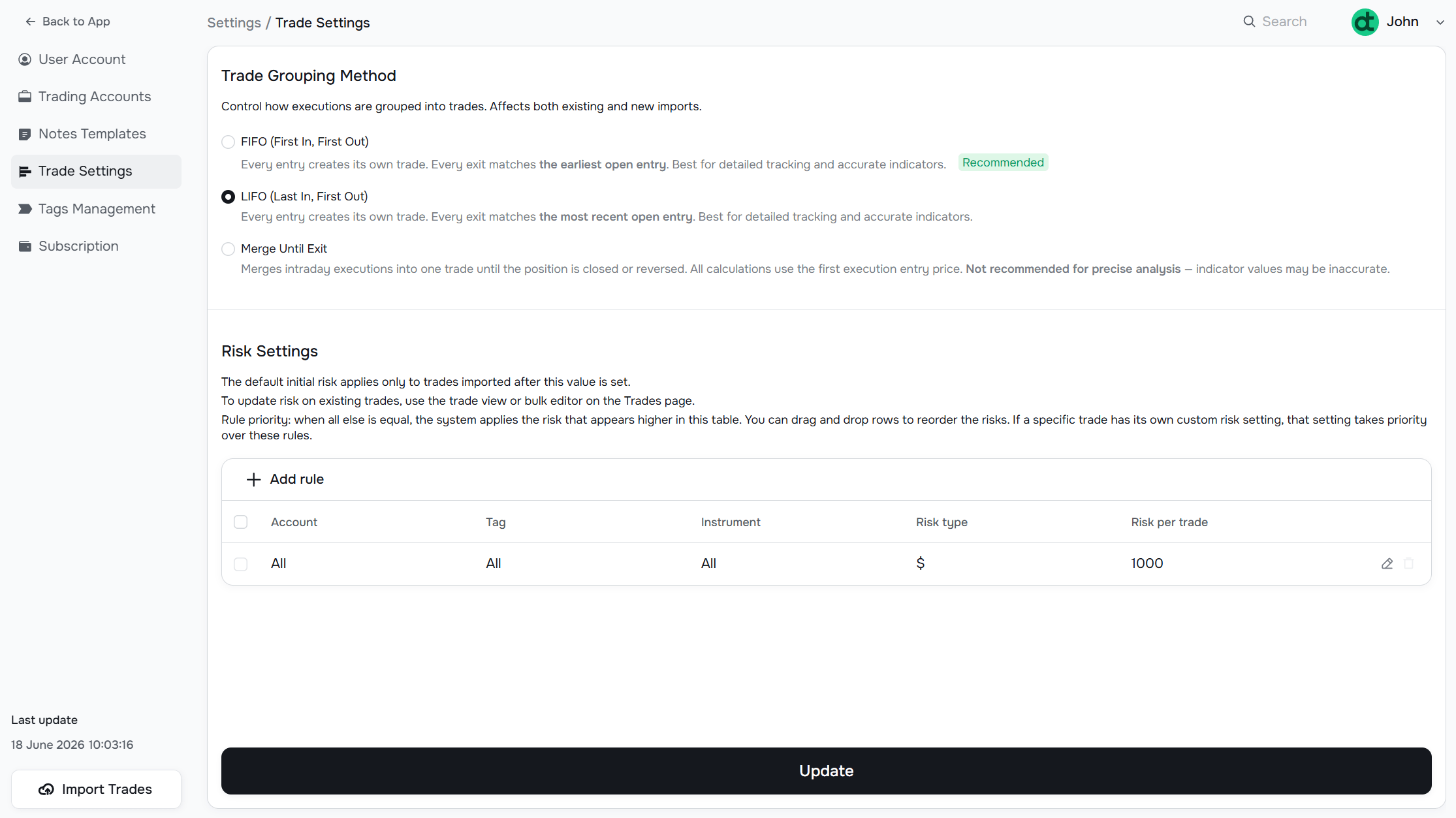
Risk settings live in Settings → Trade Settings, below the grouping method.
How rules work
Risk is applied through a rule table. Each rule defines a combination of Account, Tag, and Instrument, plus a risk type and amount.
The default rule covers everything: All accounts, All tags, All instruments, $500.
You can add more specific rules — for example, $200 for a particular tag, or $1,000 for trades in a specific account.
Rule priority
When a trade matches multiple rules, the rule that appears higher in the table takes precedence. Drag and drop rows to reorder them.
A trade-level custom risk always overrides any rule.
Risk types
Currently only the fixed monetary amount ($) is supported — expressed in whatever base currency you have set in your account. Percentage-based risk is planned for a future update.
When rules apply
The default initial risk applies only to trades imported after this value is set.
Rules are applied retroactively to all trades that match the group defined in the rule. When multiple rules match a trade, the one positioned higher in the table takes priority. In edit mode you can drag and drop rows up and down to control the order. If a specific trade has its own custom risk set, that value always takes priority over all rules.
Example setup
| Priority | Account | Tag | Instrument | Risk type | Risk per trade |
|---|---|---|---|---|---|
| 1 | Live Account | High Conviction | All | $ | 1000 |
| 2 | Live Account | All | All | $ | 500 |
| 3 | All | All | All | $ | 250 |
Rule 1 has the highest priority — a trade tagged "High Conviction" in the Live Account gets $1,000 risk. If it doesn't match rule 1, rule 2 applies: any other Live Account trade gets $500. Rule 3 is the fallback: everything else gets $250.
Have a question?
Let us help!
To get the best response, follow these steps when submitting your request:
Be Clear
Briefly describe the issue and any key details, like the feature used or an error message
Add Context
Explain what you were trying to do and what led to the issue
Attach a Screenshot (Optional)
A visual reference can speed up troubleshooting
We'll review your request and get back to you soon!
Get latest updates
on Datrade
Disclaimer: Datrade is not an investment advisor or signal provider. All market data and analytics are provided for informational purposes only and do not constitute financial advice or trading recommendations. Past performance is not indicative of future results, and no performance outcomes are guaranteed. Users are solely responsible for their trading decisions and actions; Datrade accepts no liability for any losses incurred from use of our data or content. Use of this site constitutes acceptance of our Terms of Service and Risk Disclosure.